Unlock
Rebirth 1
Complete your 1st Rebirth, then the permanent map barrier drops and the market becomes available.
Guide
Learn how Farmer's Market orders work in Roblox Greedy Growers, how to grow a valid fruit, use a Fruit Basket and turn successful deliveries into long-term Ticket progress.
Updated By Tom Mobi
Quick answer
Unlock
Rebirth 1
Complete your 1st Rebirth, then the permanent map barrier drops and the market becomes available.
What you need
A matching harvest
Match the requested fruit, quantity, size and mutation before you pack the order.
Why it matters
Cash + Tickets
The live order board determines the reward. Farmer's Tickets can fund eggs, gear and other post-Rebirth progression.
Farmer's Market orders give your farm a goal beyond selling the next healthy tree. Instead of growing any fruit that happens to be profitable, you check the order board, produce the requested match and deliver it through the market workflow.
The important distinction is that the market is the order system, while the Fruit Basket is the carrying and packaging tool. A basket helps move the required harvest; it does not create Tickets by itself. The successful delivery is what qualifies for the reward shown by the live game.
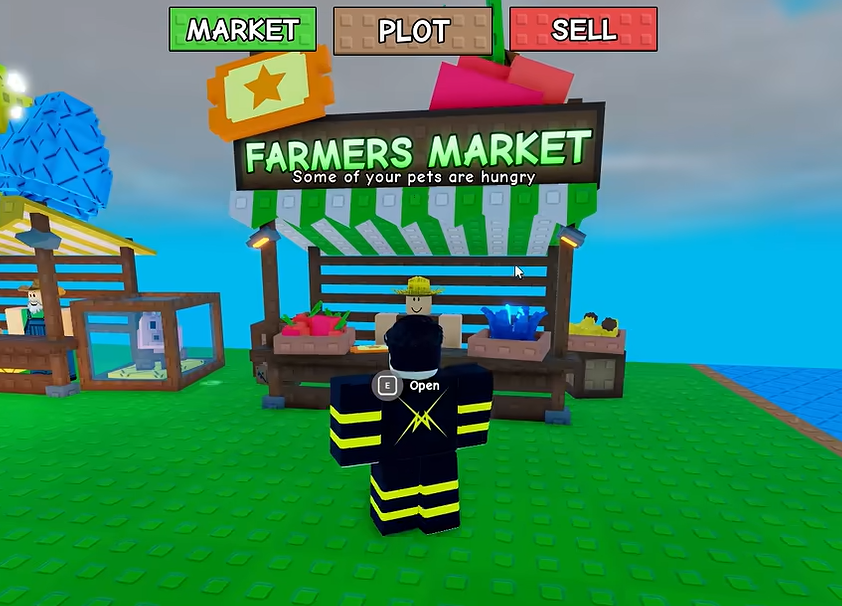
The Farmer's Market is an order area for players who have moved beyond the first Cash loop. NPCs present requests that can combine a fruit name with a quantity and a quality condition, such as a Huge fruit or a named mutation. That makes the market a bridge between everyday planting and deliberate mutation farming.
Current project data describes the market as a post-Rebirth feature. Because the live game can change requirements, use the in-game unlock panel as the final authority rather than treating an old guide value as permanent.
To unlock the Farmer's Market in Greedy Growers, you must complete your 1st Rebirth.
Grow your first plot as far as you can and save enough Cash to trigger your first Rebirth.
After you rebirth, the permanent map barrier blocking the Farmer's Market drops automatically. You can then access the Daily Quest Boards to trade your mutations for Tickets.
Use market rewards to hatch Pets and power up your farm to prepare for Rebirth 2 and beyond.
If you are still learning the buy-grow-harvest loop, use the Rebirth Guide and the Rebirth Calculator to plan the reset before you begin chasing order-specific fruit. Once inside the market, the Daily Quest Boards are your starting point for mutation-based Ticket runs.
Read every condition before you plant. The fastest way to waste a valuable seed is to grow the right fruit with the wrong size or mutation and discover the mismatch only at delivery.
The requested fruit must match the order. Plant the corresponding seed instead of hoping that a different crop will be accepted as a substitute.
Some requests ask for more than one fruit. Plan enough plots and harvests to fill the displayed count before you start packaging the delivery.
An order can include a condition such as Huge. A normal fruit may not satisfy a size-specific request even when the fruit name is correct.
A named mutation such as Slimy or Scaled is part of the requirement, not a bonus. Check the fruit state before you commit it to the order.
When an order calls for a delivery, the Fruit Basket connects your harvest to the market hand-in. Follow the order first, then use the basket as the transport step:
Write down the fruit, amount, size and mutation conditions before buying seeds.
Choose a seed and support setup that can produce the requested fruit without risking your entire reserve.
Keep the matching fruit intact, equip the Fruit Basket and interact with the fruit when the delivery flow calls for it.
Carry the packaged basket to the marked shipping or market drop-off point and read the reward confirmation.
For the full item workflow, read the Greedy Growers Fruit Basket Guide. It explains why a matching order matters more than simply filling the basket with the most expensive fruit you have.
Start with the cheapest reliable route that satisfies the request. Use high-tier seeds or risky mutations only when the order reward justifies the Cash and exposure involved.
Start with the requested crop, then compare the 28 entries in the Seed Database before spending Cash on a higher-tier attempt.
Compare seeds →If the order names a mutation, use the 11-entry Mutation Database to check its multiplier and known source before harvesting.
Check mutations →Pets can help with mutation, size or growth routes. The current Pet Database has 28 listed companions to compare.
Review pets →Weather can create a short farming window for eligible mutations. Prepare the plot before the event rather than waiting for its final seconds.
Plan weather →Weather windows are short, and a lightning-linked mutation can be expensive to lose. The current weather data tracks 6 events, so prepare the plots before an event starts and use the Lightning Risk Calculator before holding a high-value tree for another cycle.
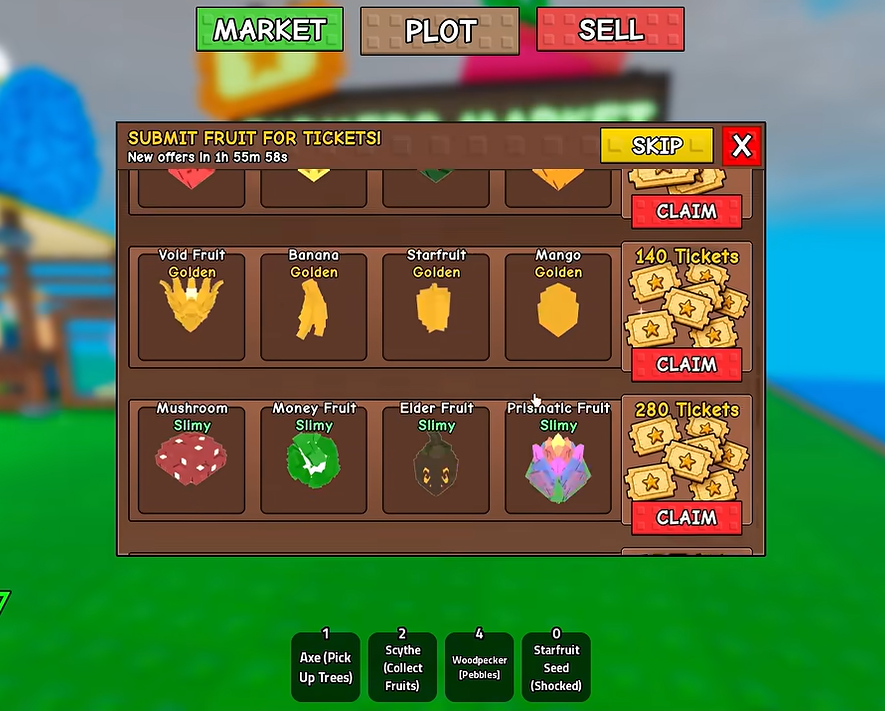
A completed market delivery can award Farmer's Tickets according to the reward shown in the live order panel. Tickets are valuable because they connect the market loop to other progression systems instead of being another form of Cash that disappears after a Rebirth.
Use Tickets for eggs and compare their drop tables before choosing a target pet.
Open Pets & Eggs →The Gear Shop can offer Ticket-priced items such as the Fruit Basket and other utility tools.
Read the Fruit Basket Guide →Keep a reserve rather than spending every Ticket immediately; new updates can add limited-time uses.
Check game updates →The Farmer's Market is a post-Rebirth order area where NPCs request specific fruit, quantities and sometimes extra conditions such as Huge size or a named mutation. Complete the matching delivery to receive the reward shown by the live order board.
Complete your 1st Rebirth to unlock the Farmer's Market. After rebirthing, the permanent map barrier drops automatically and the Daily Quest Boards become available for trading mutations for Tickets. Use the rewards to hatch Pets and prepare for Rebirth 2 and beyond.
Read the order conditions, grow a matching fruit, harvest it while it still meets the requested conditions, equip the Fruit Basket if the delivery requires one, package the fruit and carry the completed load to the marked drop-off point.
Farmer's Market deliveries are one Ticket source. Tickets can also come from other progression activities such as collection milestones and active codes, depending on the current game version. Check the live reward panel and the Codes page before spending them.
Yes, when the order names a mutation. A fruit with the wrong mutation can fail the requirement even if its seed and size are correct, so compare the request with the Mutation Database before harvesting.
No. The Fruit Basket helps gather and transport matching fruit. The completed Farmer's Market delivery is what qualifies for the order reward; owning or equipping the basket alone does not generate Tickets.
Jump to related Greedy Growers guides, tools and databases.
Fruit Basket Guide
Compare pet teams, egg odds and useful passive abilities.
How to farm Weather, Lightning, Pet and Worm mutations.
Every Rebirth level, unlock and Cash requirement.
Start safely and survive your first lightning strikes.
How long until you can afford your next Rebirth.
Bankruptcy risk and expected value before you harvest.
Every seed's rarity, cost and spawn chance.
Every mutation multiplier and how it triggers.
Egg drop tables and pet passive abilities.
Multiplier, growth speed and mutation effects.
Growth speed and lightning risk for each event.